
Ciakko finds what a long take usually loses: pauses, "uhm" and "ehm", the sentences you marked as retakes while recording. It proposes them as cuts; nothing is cut until you accept.
Clean up
Clean up in the timeline toolbar: Shorten pauses, Remove filler words or Both. Filler words need the speech model of the captions.

The proposals appear in their lane, in red. A pause is shortened to a short breath, not removed whole. The retakes you marked while recording are already there when the take opens, in orange.

Click a proposal: Play the part plays it, Play without it plays the video as it would be, then Accept (Enter) or Reject (Del). With more than one waiting, Accept all and Reject all appear in the toolbar.

Every cut lands on a quiet instant, with a short fade, so it does not click.
The Script
Tab Script, Transcribe: the words of the take, with their time, written on your PC.
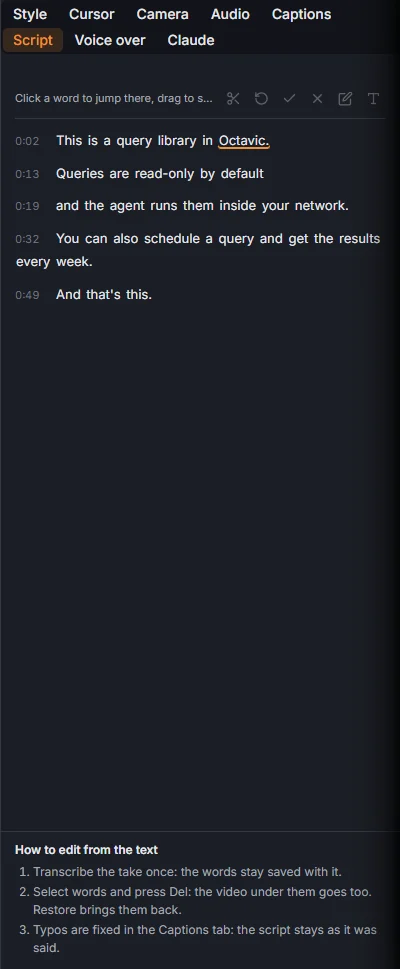
- Click a word to jump there in the video.
- Drag over words to select them, then Cut (or Del): the video under them goes too. Restore brings them back.
- Title card makes a full screen card from the selected words.
- Edit caption text fixes a word in the captions; the Script stays as it was said.
The rules behind the proposals, and what is left alone on purpose: Remove filler words and silences