
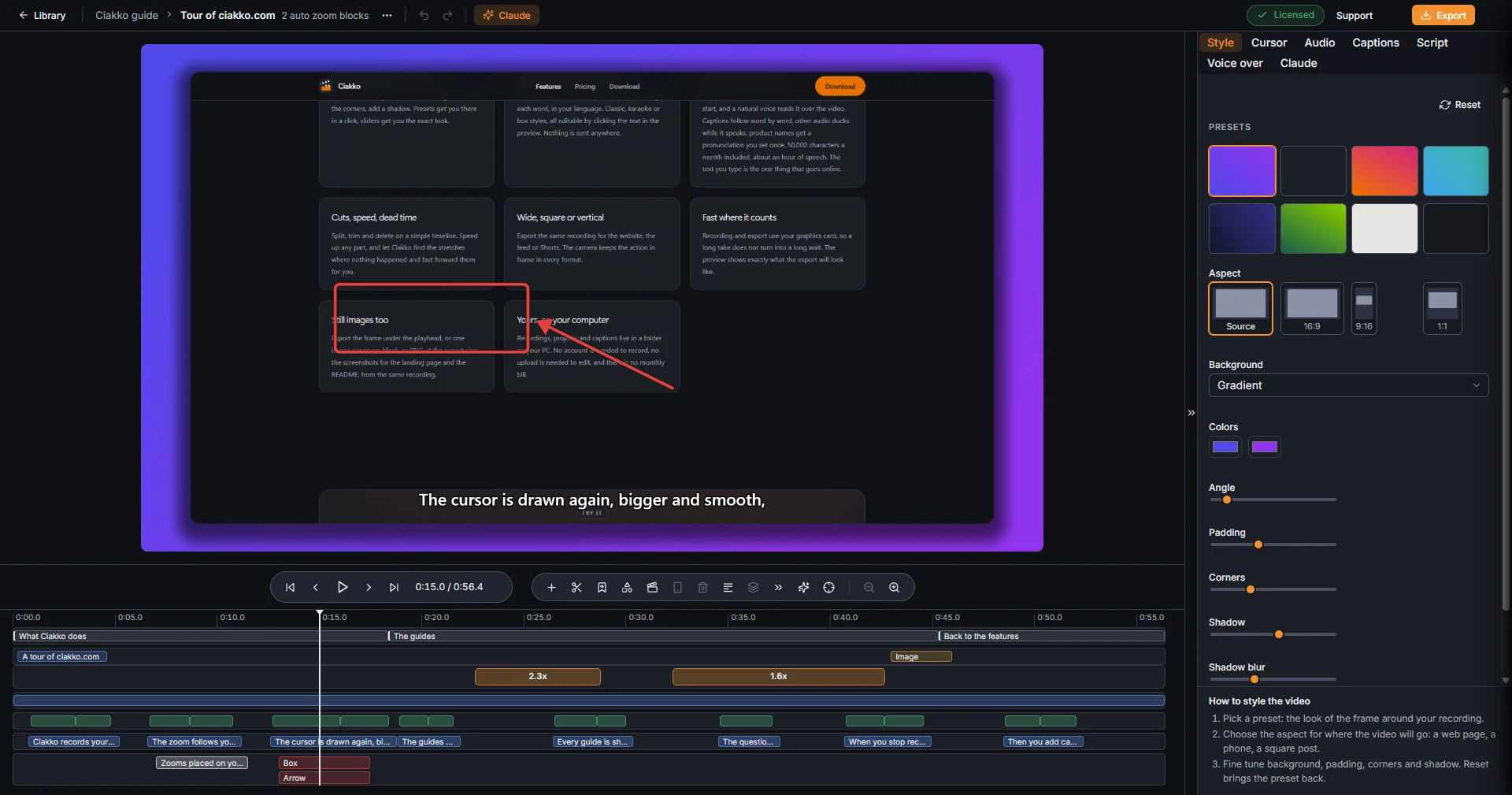
The editor shows the take as it will be exported. Every change saves by itself.
Open a take
A take opens in the editor when the recording stops, with a double-click in the Library, or from Recent recordings on the Ciakko icon next to the clock.
The top bar

From the left: Library, the project and the take, Project actions (the three dots), Undo and Redo, Claude. On the right: the license, Support and Export.
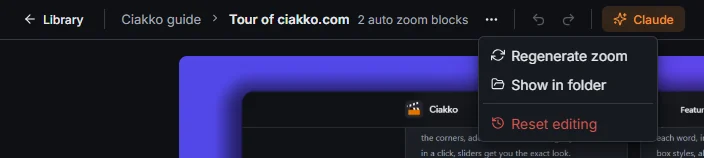
- Regenerate zoom builds every zoom again from the clicks.
- Show in folder opens the take's folder.
- Reset editing takes the take back to just recorded. Ctrl+Z brings everything back.
Playing
Under the preview: Go to start, Previous frame, Play, Next frame, Go to end, and the time. Space plays and pauses; click the ruler of the timeline to move the playhead.
The timeline

Time runs from left to right. Each kind of edit has its own lane, from the top:
- the ruler, where you click to move the playhead;
- chapters: double-click here to add one;
- scenes: title cards, images, clips and face scenes;
- zooms: the orange blocks with their level;
- clips: the recording itself, split where you cut it;
- proposed cuts: pauses, filler words and retakes waiting for your yes or no;
- captions, in green;
- voice over, in blue, one block per line;
- texts, arrows and boxes.
A lane appears when the take has something to put in it.

The toolbar above the lanes: Add zoom, Split, Add chapter, Add annotation, Add scene, Create Short, Delete, Remove all zooms, Apply this zoom level to all blocks, Speed up idle time, Clean up, Frame the zoom, and Zoom out the timeline and Zoom in the timeline. When you select something, its settings appear on the right of the toolbar. Ctrl and the mouse wheel zoom the timeline too.
The tabs on the right
Style, Cursor, Camera (when the take has a webcam), Audio, Captions, Script, Voice over and Claude. Every tab has Reset and a short guide at the bottom; Read the guide next to it opens the page of this guide on that tab. Hide inspector, the arrow on the left edge of the tabs, gives the preview more room.
Undo and autosave
Undo (Ctrl+Z) and Redo (Ctrl+Y) cover the last 100 changes. The project music and the take's instructions save at once and are outside undo. Ciakko saves the take a moment after every change and always reopens it as you left it.
The keys of the editor are on the Keyboard shortcuts page.