
Export a take
Export at the top right of the editor.
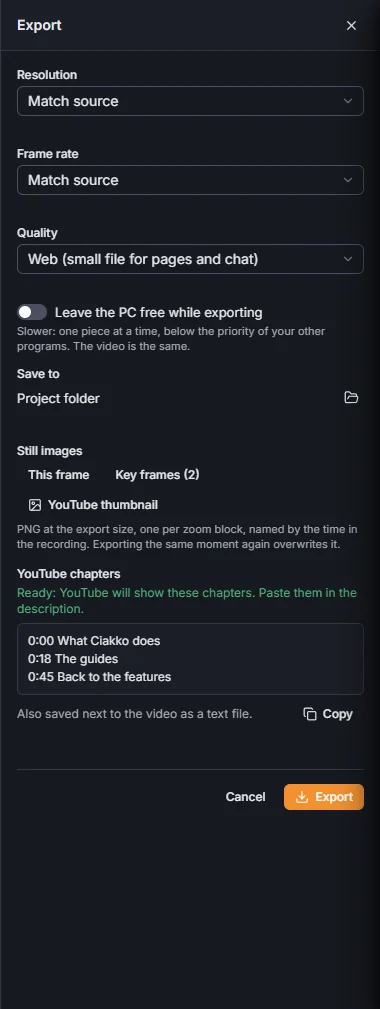
- Resolution: Match source, 1080p or 4K.
- Frame rate: Match source, 30 fps or 60 fps.
- Quality: High for YouTube, Balanced (smaller file), or Web (small file for pages and chat) for a page or a chat.
- Leave the PC free while exporting: one piece at a time, below the priority of your other programs. Slower, the same video.
- Save to: Project folder, Choose folder for another place, Use the project folder to go back.
Press Export. The progress shows at the top of the editor; Cancel export stops it.

The export goes on if you close the editor, and Windows tells you when it is done. Next to the MP4 Ciakko writes the captions .srt file and, with chapters, the list for YouTube.
The export uses the graphics card. It renders the video in pieces at the same time and joins them, so a long take does not mean a long wait.
Export a whole project
Library, the project, Export project: every take in the order of the Library, joined in one video, with one captions file and one chapters list. Choose which takes go in; a take already exported with the same settings is not exported again. The music of the project plays across the takes without a break.
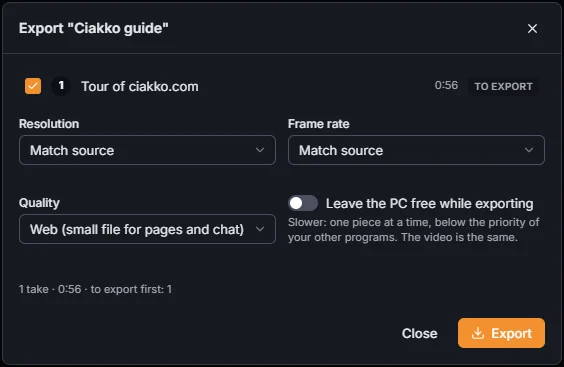
All the takes must have the same size and frame rate.
Still images
In the export panel, Still images: This frame saves the frame under the playhead as a PNG, Key frames saves one per zoom block. They are composed like the video, at the export size.
Exporting needs the trial or a license.